›summ
“summarize this”
Reads the entire article — every section, not just what's on screen — and hands back the three things that matter.
Leafy works on the website you’re viewing, researches the public web, and helps with the apps you connect. Tell it what you need in plain words.
The AI browser wars are just getting started
Three takeaways: browsers are consolidating fast, Chrome’s lead is narrowing, and agents — not tabs are the new battleground.
AI browser wars — brief
Document · saved
Animated preview. Install Leafy to try these tasks on your own pages.
How it works
After installing Leafy, try this on a real website. The animations on this site are previews.
Add Leafy to Chrome and create your account in the extension. Your seven-day trial includes unlimited requests, with no card needed.
Visit linear.app, quickly tap Ctrl twice, then click on the page to place your request.
Type “Show me the pricing page” and send it. Leafy can navigate the site for you. No app connection is needed for this first task.
What Leafy can do
Start with the page in front of you, ask for public research, or connect an app when you need its private information.
Ask Leafy to navigate, click, fill in forms, or find an answer on the page. It works with the website open in your browser.
No connected app needed. Sign in to the website when your task needs an account.
Ask a question that needs more than one page. Leafy searches public sources and can save a report with the evidence it finds.
No connected app needed for public research.
Connect your email, CRM, calendar, or other tools in Leafy first. Then ask it to find information or take action using the access you grant.
Requires connecting the relevant apps. Leafy cannot read your CRM or email until you connect them.
Speaks your shorthand
No prompts to craft, no syntax to learn. Leafy reads the page in front of you and figures out what you actually meant — then answers in one line and does the rest.
“summarize this”
Reads the entire article — every section, not just what's on screen — and hands back the three things that matter.
“put this on my calendar”
Pulls the title, time, and place, attaches the link, checks you're free — then adds it. No double-booking.
“remind me Tuesday”
Sets a reminder for the right day with the right context — no date-picker, no form.
“add this to my list”
Captures it to the right list with a sensible due date — and checks it off when it's done.
“file a bug for this”
Opens an issue in your tracker with steps to reproduce and a screenshot of exactly what broke.
“compare these for me”
Researches both across live sources and writes a sourced, side-by-side brief you can save and download.
Real output
Each of these came back from a single ask. Explore the actual saved output — the comparison is available as a PDF, and the research brief as an image.
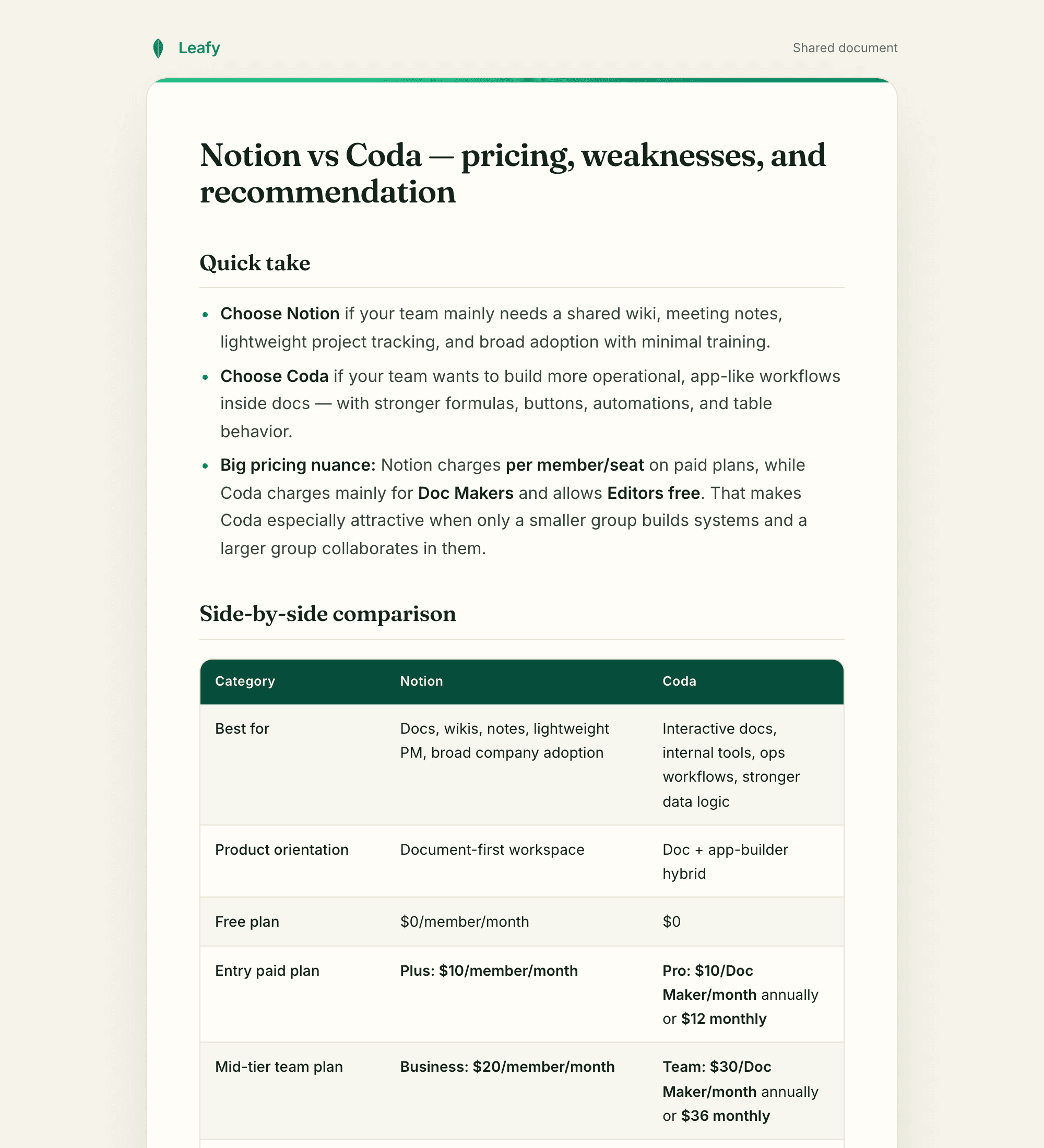
“Compare Notion vs Coda for our team.” — a sourced table, a quick take, and the links it pulled from.
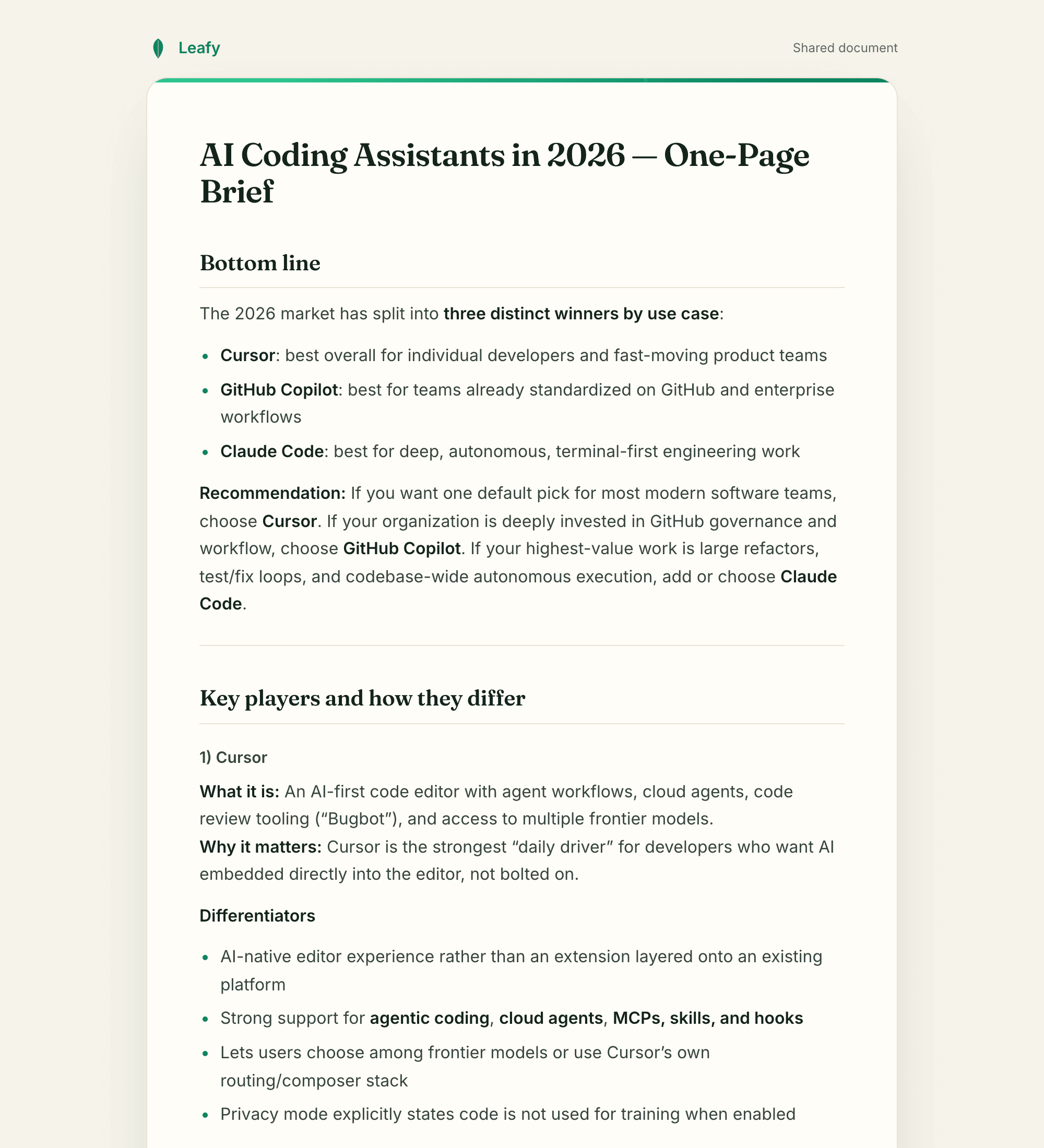
“Brief me on AI coding assistants in 2026.” — headings, takeaways, a recommendation, sources kept.
Docs, slide decks, and spreadsheets come back properly laid out — ready to read and reuse, not a wall of chat.
Every artifact opens as its own clean page you can print or save as a PDF. No Google Docs connection needed.
Your documents stay saved in Leafy. Open them again or download a copy when you need it.
Connections
From your inbox to your CRM — Leafy acts through the apps you connect, with only the permissions you grant.
A few of the 1,000+ apps Leafy connects to — new ones land every week.
Learns how you work
Leafy keeps a private, organized memory of how you like things done — your shorthand, your tone, the way each of your tools is set up. The more you use it, the less you have to explain.
You: “shorter, and skip the greeting next time”
Saved to your preferences.
You connect only the apps you choose.
Leafy acts with your permissions — never more.
Your knowledge base is yours; export or delete it anytime.
Everything in one place
Whatever you capture or ask Leafy to track lands in tidy lists you can reach from any page. Nothing clutters your screen until you want it.
Simple pricing
Try every capability free for seven days with unlimited requests. Then choose Leafy Pro to keep going.
Leafy Pro
Unlimited requests after your trial. Your tax-inclusive total is shown before payment.
7 days free · unlimited requests · no card to try
Already using Leafy? Subscribe inside the extension. Cancel anytime.
Your free trial starts when you create your account and lasts seven days. After it ends, subscribe to Pro for unlimited requests. No automatic charge without a subscription.
Install the Chrome extension, sign in there, and put Leafy to work on any site in a couple of minutes.
Add Leafy to Chrome7 days free · unlimited requests, no card needed. Then $9/month + applicable VAT.
Already using Leafy? Start your subscription inside the extension.